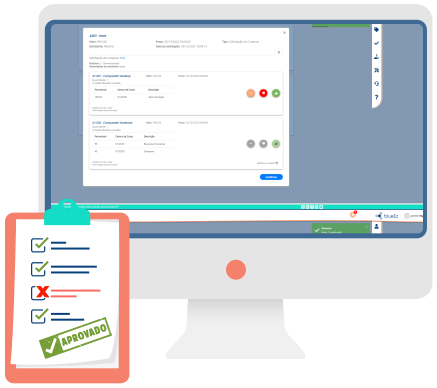
Purchase approval workflow, with thresholds and history
Approve what you need in an intuitive and complete way.
The approvals module integrates with the flow you need and the platforms you use in an easy, fast, and effective way.
- Approval on mobile or desktop
- Threshold by amount and business rule
- History, attachments and the request context
- Integration with blueEz modules and the ERP
Decide with the purchasing context

Access mobile from wherever you are
The approvals module can be accessed on desktop or mobile, effectively and practically. Thus, work flows with greater efficiency!

Approval by threshold
The responsible person for approval can be directed according to pre-established value limits, also known as thresholds

Complete communication
Send what you need in the request description: tables, images, graphs, indicators, etc. Thus, everything necessary in the communication between requester and approver is present in the module

Intuitive and organized
The module presents organized requests that make visualization more pleasant, facilitating use
Invoice attachments
It's possible to attach and access invoices with just one click through the platform, grouping all information about items, products, and purchases
Threshold, response and integration

Complement response options
Respond to the request with actions that make sense for your sector, such as: perform new quotation, in addition to the standard options approve or reject

Configured to the business model
The configuration of the approval process progress is adaptable to each business model. It's possible to parameterize forms, responsible persons, groups, and value thresholds

Facilitated integration
Integrate the blueEz approvals module with all other platform modules and any management tool or ERP your company uses

Approval History
Track approval progress through status and consult previous approval history, filtering by date, type, approver, or requester.
Learn here all the details and specificities of the blueEz Approvals Module
More about approvals

Clear your doubts about the approvals module – Watch our tutorial!
Now you can check out how blueEz modules work on our YouTube channel!
More: How to make a quotation in blueEz? | How to make an order in blueEz?
Frequently asked questions about approvals
Does the approver see the quotation before deciding?

In the purchasing flow, the approver sees suppliers, amounts and the same charts as the buyer.
Can I approve from a phone?
Yes. The approvals module can be used on desktop or mobile.
How do thresholds work?
The approver can be assigned by amount limits, also with sequence, consensus and levels.
Do approvals integrate with the ERP?
The module integrates blueEz processes, management tools, ERPs and other systems. There is an API form and a webhook with the review response.
Can I use approvals without the other modules?
Yes. The module works integrated and can also be used on its own.
How do I request a demo?
Use the demo button on this page. The team shows thresholds, history and the link with purchasing or the ERP.
Do you want to be part of the blueEz experience?
Contact our sales team and learn how blueEz can transform your business work routine